HOW TO CHANGE ID CODES OR CLONE MY SPORTDOG® BRAND SPORTTRAINER® SD-575
WHEN TO CHANGE THE ID CODE
When matching 2 or more remotes to control the same collar(s).
If you notice that 2 remotes are controlling the same collar unintentionally.
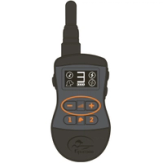
Using the Intensity Buttons (+/-), select the number 3 on the screen of your remote.
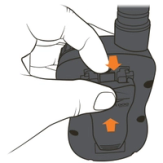
Remove the belt clip from the back of the remote by pulling the tab at the top of the clip towards you and sliding up at the same time.
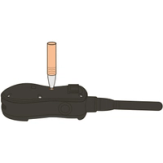
Locate the small button on the back of the remote. Use a pen or something small to press the button in. When the Mode Button is pressed, the dog head on the screen will disappear.
Using the Intensity Buttons (+/-), select an ID Code 1-99. Wait 5 seconds for your selection to flash and lock in.
Repeat steps 1 and 2 on all other handheld remotes you want controlling the same collar(s). You will need to enter the same ID Code on all the remotes.
If multiple remotes are controlling your collar(s) and this is not what you want, you will only need to change the ID Code on one remote.
Pair your collar(s) back to one of the remotes that should be controlling your collar(s). If you are unsure how to pair a remote and collar, please refer to HOW TO PAIR ONE COLLAR TO YOUR SPORTDOG® SPORTTRAINER® SD-575 and HOW TO PAIR AN ADDITIONAL COLLAR TO YOUR SPORTDOG® SPORTTRAINER® SD-575.
CONTACT CUSTOMER CARE
If you need further assistance, please contact our customer care team.